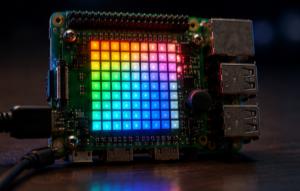
Full Sense HAT demo with Pi4J
A single script that exercises every major feature of the Sense HAT via Pi4J — LED matrix, sensors, IMU, joystick, colour sensor and more.
FullDemo is a "tour of the Sense HAT" — a single script that walks through every major feature the Pi4J SenseHat driver exposes, one section at a time, printing what it does to the console so you can follow along.
Source code: projects/FullDemo/FullDemo.java
Use it as a diagnostic tool when setting up a new board, or as a reference to see how each Pi4J API is called.
What it demonstrates
The script runs through the following sections, in order:
- Version detection — calls
hat.getVersion()to tell apart the original Sense HAT and the Sense HAT v2. - LED matrix: clear + fill — uses
hat.clear(),hat.fill(r, g, b)andhat.fill(Argb32.fromRgb(...)). - LED matrix: setPixel — draws two diagonal lines using
hat.setPixel(x, y, r, g, b)andhat.setPixel(x, y, argb). - LED matrix: setPixels(int[]) — writes a gradient to the whole 64-pixel array in one call.
- LED matrix: setPixels(int[][]) — same idea, but with
[R, G, B]triplets per pixel. - LED matrix: getPixels snapshot — reads the current state of the display back with
hat.getPixels(). - LED matrix: showLetter — shows a single character with optional foreground/background colors.
- LED matrix: showMessage variants — scrolls text with different speeds, colors and scroll directions (
ScrollDirection.LEFT_TO_RIGHT). - LED matrix: rotation + flips — cycles through
Rotation.ROTATE_0..270, thenflipHorizontal()andflipVertical(). - Humidity sensor (HTS221) — reads humidity and derived temperature.
- Pressure sensor (LPS25H) — reads pressure and derived temperature.
- Colour sensor (TCS3400) — only available on the Sense HAT v2; reads clear/R/G/B channels.
- IMU: accelerometer + gyroscope (LSM9DS1) — enables the IMU, then reads raw acceleration, gyroscope, and computed orientation in degrees and radians.
- IMU: magnetometer / compass — reads the compass heading and the raw magnetic field.
- All sensors — enumerates every
Sensorknown to the driver viahat.getAllSensors(). - Joystick: polling with getEvents() — for 5 seconds, prints every joystick event returned by
hat.getEvents(). - Joystick: getController() state read — reads whether the center key is currently pressed via the underlying
GameController. - Joystick: listener — registers a
Consumer<Event>withhat.addJoystickListener(...)for 5 seconds, then removes it. - Joystick: waitForEvent() — blocks on the joystick for up to 10 seconds using a watchdog thread that interrupts the wait if nothing happens.
- Demo complete — scrolls a farewell message in magenta.
Why it's useful
- It's the fastest way to check that a fresh Sense HAT is wired up correctly.
- Every section is small enough to copy-paste as the starting point for your own project.
- Running it against both a v1 and a v2 board makes the differences (like the missing colour sensor on v1) immediately obvious.
Running it
This script depends on a specific branch of pi4j-drivers (my igfasouza branch), so clone and install it locally first:
git clone -b igfasouza https://github.com/igfasouza/pi4j-drivers.git
cd pi4j-drivers
mvn install
Then run it with JBang on a Raspberry Pi with a Sense HAT attached:
jbang projects/FullDemo/FullDemo.java
Be ready to move the joystick a few times when the script asks — some sections will just sit and wait for input.