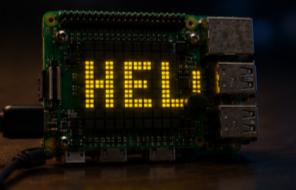
Hello from Pi4J on the Sense HAT
2026, Jul 21
The simplest possible Pi4J + Sense HAT script — scrolls a "Hello from PI4J!" message on the 8x8 LED matrix.
Hello is the smallest useful Sense HAT script in this repo — a good starting point if you have never used Pi4J before. It just scrolls the text Hello from PI4J! endlessly on the 8×8 LED matrix.
Source code: projects/Hello/Hello.java
How it works
- A
Pi4Jcontext is created withPi4J.newAutoContext(). The context handles the underlying I²C access to the Sense HAT. - A
SenseHatis opened in a try-with-resources block so it is properly closed on exit. - The matrix is cleared, then
hat.showMessage(message, 80, textColor, backColor)scrolls the string across the display with an 80 ms per-step scroll delay. - The loop runs forever, so the message keeps scrolling until you kill the process.
Two colors are set up with Argb32.fromRgb(...): yellow for the text and black for the background.
Running it
This script depends on a specific branch of pi4j-drivers (my igfasouza branch), so clone and install it locally first:
git clone -b igfasouza https://github.com/igfasouza/pi4j-drivers.git
cd pi4j-drivers
mvn install
Then run it with JBang on a Raspberry Pi with a Sense HAT attached:
jbang projects/Hello/Hello.java