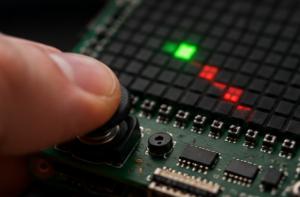
Moving a pixel with the Sense HAT joystick
Read the Sense HAT joystick events with Pi4J and move a pixel on the LED matrix, with press-and-hold movement and a color toggle on the center button.
Joystick reads events from the Sense HAT joystick (up/down/left/right/center) and moves a single pixel around the 8×8 LED matrix. Pressing the center button toggles the pixel between green and red.
Source code: projects/Joystick/Joystick.java
How it works
The Sense HAT joystick is exposed to Pi4J as a GameController with the keys UP, DOWN, LEFT, RIGHT and CENTER. This example uses polling (hat.getEvents()) rather than a listener.
Every iteration of the main loop:
- Reads all pending joystick events with
hat.getEvents(). - For each event, looks at the
key()andaction()(eitherPRESSEDorRELEASED). - If the key is
CENTERand it was pressed, togglescurrentColorbetween green and red. - If the key is a direction, stores it in
heldDirectionon press and clears it on release — that gives us "press and hold" movement. - If a direction is currently held, moves the
(x, y)pixel by the corresponding delta usingMath.floorModfor wrap-around at the edges. - Redraws the matrix and sleeps 150 ms.
The result feels a lot like driving a cursor on a tiny screen — a nice building block for menus or small games.
Running it
This script depends on a specific branch of pi4j-drivers (my igfasouza branch), so clone and install it locally first:
git clone -b igfasouza https://github.com/igfasouza/pi4j-drivers.git
cd pi4j-drivers
mvn install
Then run it with JBang on a Raspberry Pi with a Sense HAT attached:
jbang projects/Joystick/Joystick.java