Scrolling and rotating text on the Sense HAT
2026, Jul 21
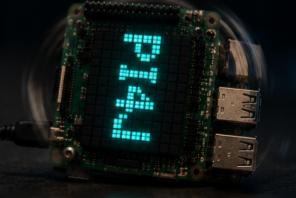
Scroll a message on the Sense HAT LED matrix in both directions and cycle through the four rotations of the display.
ScrollRotate extends the basic Hello example by also demonstrating the two scroll directions and the four rotations supported by the Sense HAT LED matrix.
Source code: projects/ScrollRotate/ScrollRotate.java
How it works
The main loop:
- Sets the current display rotation using
hat.setRotation(...), cycling throughROTATE_0,ROTATE_90,ROTATE_180andROTATE_270. - Scrolls the string hello PI4J from right to left using
ScrollDirection.RIGHT_TO_LEFT. - Then scrolls the same message from left to right with
ScrollDirection.LEFT_TO_RIGHT. - Increments the rotation index and repeats forever.
This is a good example to see how GraphicsDisplay.Rotation and GraphicsTextAnimator.ScrollDirection interact — the text always reads the correct way for the current rotation.
Running it
This script depends on a specific branch of pi4j-drivers (my igfasouza branch), so clone and install it locally first:
git clone -b igfasouza https://github.com/igfasouza/pi4j-drivers.git
cd pi4j-drivers
mvn install
Then run it with JBang on a Raspberry Pi with a Sense HAT attached:
jbang projects/ScrollRotate/ScrollRotate.java