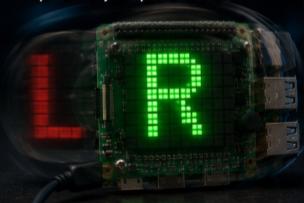
Detecting rotation with the Sense HAT gyroscope
Use the Sense HAT gyroscope to detect the direction of rotation and show L / R on the LED matrix.
Spin uses the Sense HAT gyroscope to detect the direction the board is being rotated around its vertical axis and shows a colored letter on the LED matrix — R in green for right, L in red for left, or a dim - when the board is still.
Source code: projects/Spin/Spin.java
How it works
The IMU on the Sense HAT can report angular velocity (how fast the board is rotating) with hat.getGyroscopeRaw(). The method returns a double[] with the values for the X, Y and Z axes in degrees per second.
Every iteration:
- Reads the gyroscope with
hat.getGyroscopeRaw(). - Takes only the Z component (rotation around the vertical axis).
- Compares it against a small threshold (
SPIN_THRESHOLD = 1.0) to filter out noise. - Depending on the sign, calls
hat.showLetter('R', green),hat.showLetter('L', red)orhat.showLetter('-', idle). - Sleeps 100 ms and repeats.
The gyroscope reports the rate of rotation, not the current orientation, so the letter only appears while you're actively spinning the board.
Running it
This script depends on a specific branch of pi4j-drivers (my igfasouza branch), so clone and install it locally first:
git clone -b igfasouza https://github.com/igfasouza/pi4j-drivers.git
cd pi4j-drivers
mvn install
Then run it with JBang on a Raspberry Pi with a Sense HAT attached:
jbang projects/Spin/Spin.java