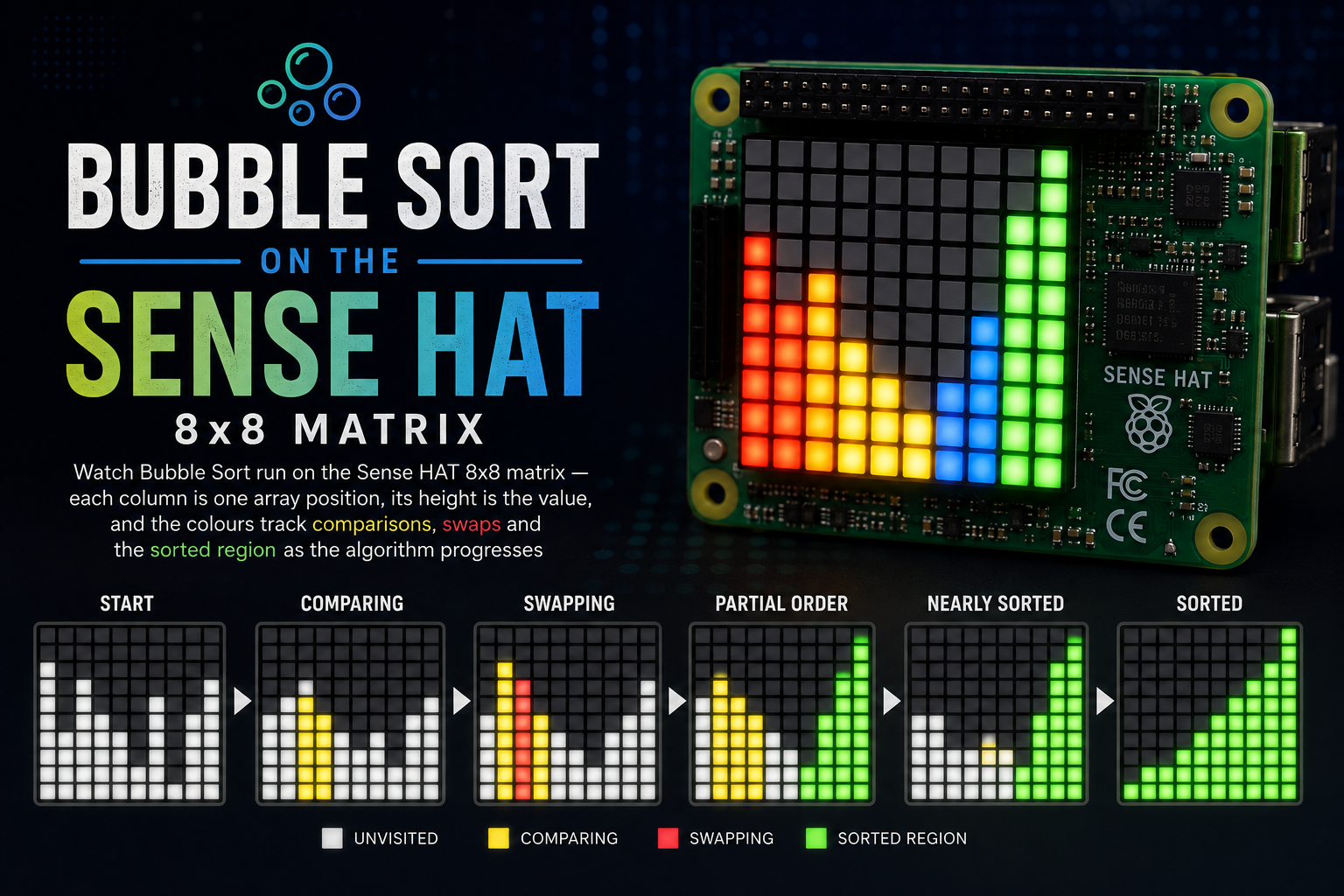
Visualising Bubble Sort on the Sense HAT
Watch Bubble Sort run on the Sense HAT 8x8 matrix — each column is one array position, its height is the value, and the colours track comparisons, swaps and the sorted region as the algorithm progresses.
BubbleSort turns the Sense HAT into a tiny algorithm-visualiser. Eight columns of the 8×8 LED matrix map directly onto an eight-element array: the column index is the position, the column height is the value. As the sort runs, the colours narrate what the algorithm is doing so you can literally watch the largest values bubble to the right.
Source code: projects/BubbleSort/BubbleSort.java
The colour code
The whole point is that the state of the algorithm is legible at a glance:
| Colour | Meaning |
|---|---|
| Blue | A normal, unsorted bar |
| Yellow | The two columns currently being compared |
| Red | A swap is happening between those two columns |
| Green | A position that is already in its final sorted place |
A frame with a red pair and a growing green tail on the right tells the whole story of a bubble sort in progress without saying a word.
How it works
Bubble sort is the textbook version — repeatedly walk the array, compare each adjacent pair, and swap them if they're out of order. Each full pass pushes the next-largest element to its final slot on the right, so after every pass one more column can be locked in as green.
- An
int[8]is filled with the values1..8and shuffled withCollections.shuffle. - The outer loop runs
n - 1passes. The inner loop walksjfrom0ton - 1 - i. - For each
j, bothjandj+1are drawn in yellow and the frame is held for a beat so the comparison is visible. - If
a[j] > a[j+1], the pair flashes red, the values are swapped, and the new frame is drawn — still red — for another beat before continuing. - After every outer pass, the rightmost unsorted column has bubbled into place, so it's flipped to green and stays that way.
- Once every column is green, the whole matrix flashes for a moment, the array is reshuffled and the sort starts over.
Drawing the bars
The Sense HAT origin is at the top-left (y = 0), so a bar of height h in column col is drawn from the bottom row upwards:
for (int k = 0; k < height; k++) {
    int row = 7 - k;                 // start at the bottom, walk up
    pixels[row * 8 + col] = color;   // one column, one colour
}
The whole frame is pushed with a single hat.setPixels(pixels) call rather than 64 individual setPixel calls — that keeps each animation step to a single I²C transaction and the frame rate honest.
Timing
Three constants control the pace:
COMPARE_MS— how long a yellow pair is held before deciding whether to swap. Default 350 ms.SWAP_MS— how long the red pair is shown before and after the swap. Default 350 ms.PAUSE_MS— the pause between rounds (shuffled → start, and finished → reshuffle). Default 1500 ms.
Bump them up if you're using this as a teaching aid and want more time to talk over each step; drop them if you want a mesmerising blur of colour.
Running it
Same setup as the other examples — this script depends on my igfasouza branch of pi4j-drivers:
git clone -b igfasouza https://github.com/igfasouza/pi4j-drivers.git
cd pi4j-drivers
mvn install
Then, on a Raspberry Pi with a Sense HAT attached:
jbang projects/BubbleSort/BubbleSort.java
The matrix will shuffle, sort, hold on the fully-green frame, and start again.
Tweaks worth trying
- Fewer bars. Drop
SIZEto 6 and centre the visualisation to make each step even easier to follow. - Different algorithms. The same colour scheme works for insertion sort (green grows from the left), selection sort (yellow marks the running minimum), or cocktail sort (green grows from both ends). Swap out
bubbleSort(...)and keepdraw(...). - Colour per value. Instead of a single blue, map the value
1..8to a hue so equal values are visually equal even mid-swap. - Step-through mode. Wire the Sense HAT joystick in: press to advance one comparison, hold to run continuously. Great for classrooms.
For a related "one frame, many pixels" example, see the Semaphore status light, which uses the same setPixels trick to flood the matrix with a single colour.