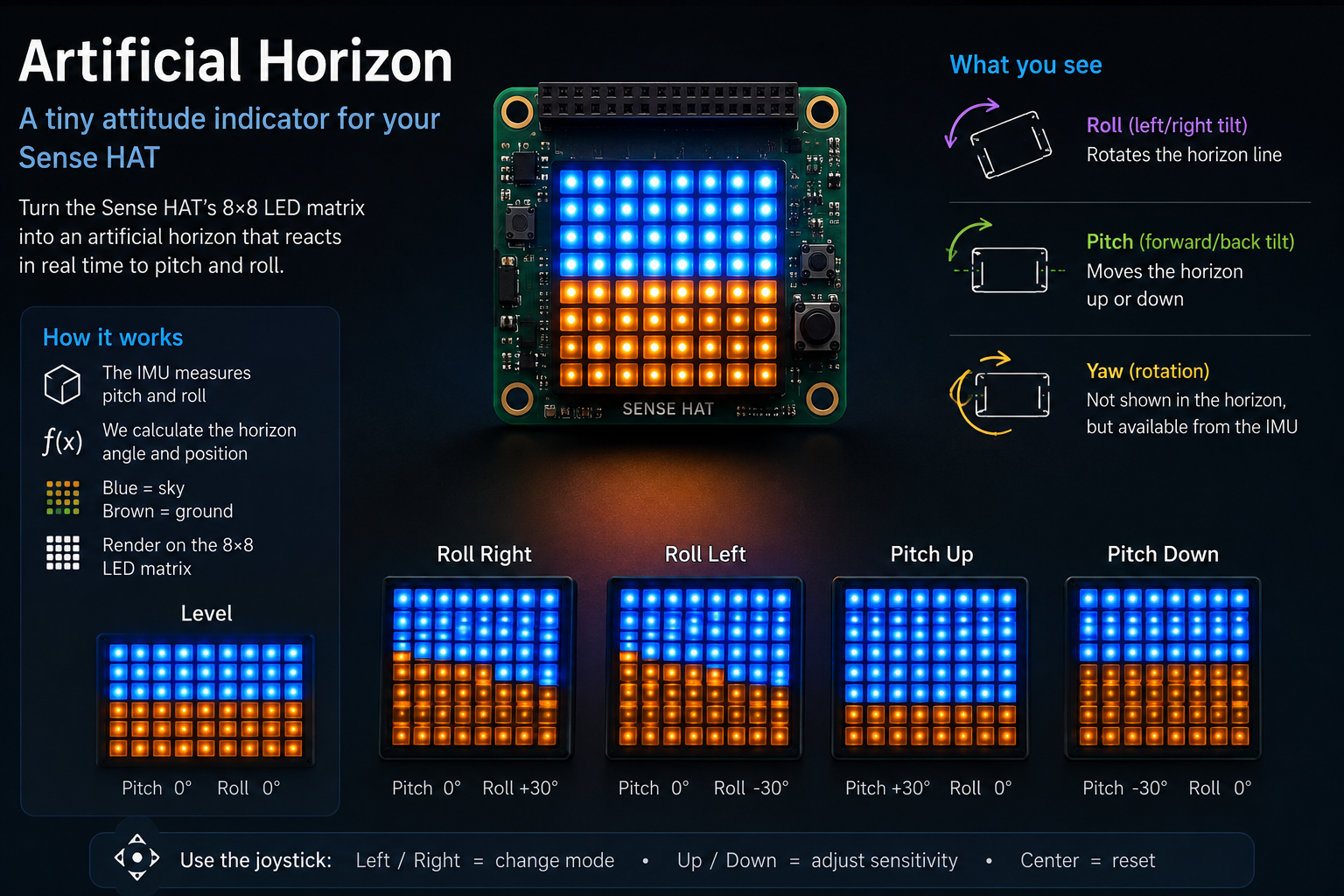
An artificial horizon on the Sense HAT LED matrix
Turn the Sense HAT into a tiny aircraft-style attitude indicator. The IMU reports pitch and roll in real time, and the 8×8 LED matrix draws blue sky above a brown ground with a horizon line that tilts as you tilt the Raspberry Pi.
ArtificialHorizon turns the Sense HAT LED matrix into a miniature aircraft-style attitude indicator. Blue LEDs paint the sky, brown LEDs paint the ground, and the horizon line between them rolls and pitches with the Raspberry Pi in real time.
Source code: projects/ArtificialHorizon/ArtificialHorizon.java
The idea
Every aircraft has one of these on the panel: an artificial horizon (or attitude indicator) that shows the plane's orientation against a stylised sky-and-ground background. Pitch the nose up, the horizon drops. Roll left, the horizon tilts the other way. It's a compact, glanceable visualisation of pitch and roll.
The Sense HAT has all the pieces to build one:
- An LSM9DS1 IMU that reports orientation as pitch, roll, and yaw in degrees.
- An 8×8 RGB LED matrix bright enough to make the two-tone sky/ground picture pop.
When the Pi is level the matrix looks like this:
🟦🟦🟦🟦🟦🟦🟦🟦
🟦🟦🟦🟦🟦🟦🟦🟦
🟦🟦🟦🟦🟦🟦🟦🟦
🟦🟦🟦🟦🟦🟦🟦🟦
🟫🟫🟫🟫🟫🟫🟫🟫
🟫🟫🟫🟫🟫🟫🟫🟫
🟫🟫🟫🟫🟫🟫🟫🟫
🟫🟫🟫🟫🟫🟫🟫🟫
Roll the board to one side and the horizon tilts with it:
🟦🟦🟦🟦🟦🟦🟦🟫
🟦🟦🟦🟦🟦🟦🟫🟫
🟦🟦🟦🟦🟦🟫🟫🟫
🟦🟦🟦🟦🟫🟫🟫🟫
🟦🟦🟦🟫🟫🟫🟫🟫
🟦🟦🟫🟫🟫🟫🟫🟫
🟦🟫🟫🟫🟫🟫🟫🟫
🟫🟫🟫🟫🟫🟫🟫🟫
Pitch the Pi forward or backward and the horizon slides vertically. Both effects combine — a nose-up roll to the left, for instance, gives you a horizon that is both tilted and pushed down.
How it works
The whole thing is one call to the IMU and a small bit of geometry.
-
hat.getOrientationDegrees()returns[pitch, roll, yaw]. Only pitch and roll are used; yaw would rotate the whole picture and isn't relevant for an attitude indicator. -
Angles are wrapped to
-180..180so the horizon doesn't jump when the Pi passes 360°. -
For each column
xof the matrix, a horizon row is computed:horizonRow = 3.5 + pitchOffset + slope · (x - 3.5)3.5is the middle of the 8-row matrix.pitchOffset = pitch · PITCH_PIXELS_PER_DEGREEshifts the whole line up or down. At 0.15 pixels/degree, ~27° of pitch fills the matrix.slope = tan(roll)gives the line's rise-per-column. Rolling the board 45° yields a slope of 1, so the horizon runs corner-to-corner.
-
Every pixel
(x, y)above the line is drawn blue (sky), every pixel below it brown (ground). A singlehat.setPixels(frame)pushes the 8×8 int array to the matrix. -
The loop repeats every 50 ms — 20 FPS is smooth enough to feel live without hammering the IMU.
The tan(roll) value is clamped to ±6 so that when the Pi is held nearly vertical the line doesn't blow up to infinity; at that point the whole matrix is one colour anyway.
The maths, visually
Think of the horizon line as y = m·x + b, where:
mis the roll slope (tan(roll)).bshifts the line up or down based on pitch.- Every column samples this line and everything above is sky, below is ground.
That's it — no floating-point rasteriser, no anti-aliasing, no rotation matrix. The 8×8 grid is coarse enough that a per-column comparison is the entire "renderer".
Running it
Same setup as the other examples in this repo — the script depends on my igfasouza branch of pi4j-drivers:
git clone -b igfasouza https://github.com/igfasouza/pi4j-drivers.git
cd pi4j-drivers
mvn install
Then, on a Raspberry Pi with a Sense HAT attached:
jbang projects/ArtificialHorizon/ArtificialHorizon.java
Hold the Pi in front of you and tilt it — the horizon should follow.
Tweaks worth trying
- Pitch sensitivity. Raise
PITCH_PIXELS_PER_DEGREEto make the horizon move faster with pitch (e.g.0.3fills the matrix at ±13°), or lower it for a calmer display. - Ground colour. Swap the brown for green (
Argb32.fromRgb(0, 128, 0)) if you prefer a fields-and-sky look over the classic aviation brown. - Centre marker. Draw a fixed white or yellow pixel at
(3, 3)and(4, 4)to represent the aircraft — the horizon then moves around the plane, exactly like a real attitude indicator. - Axis mapping. Depending on how the HAT is mounted, you might want to swap or negate pitch/roll — a one-line change against
deg[0]/deg[1]. - Yaw compass strip. Reserve the top row for a scrolling heading indicator using
hat.getCompass()and you have a mini glass cockpit.
For related examples that also read the IMU, see the Accelerometer tilt demo and the Spin gyroscope demo.